

Help & setup
Start by connecting SayWhat to your AI coding agent. Pick your tool below and follow its install guide.
Install SayWhat
Your AI coding tool is sometimes called a harness. Choose the one you use to write code.
Cursor
Paste your setup prompt into Agent chat, then check the connection.
Codex
Use your setup prompt in the desktop app or CLI on your computer.
Claude Code
Follow the manual steps to add the tool, skill, and Preflight rule.
Antigravity
Add a global Skill and license token — no MCP, no extension. The simplest adapter.
Use a different tool? See other AI agents for the available setup paths.
How Preflight works
Think of SayWhat as an editor for your work order. You describe what you want, even if the words are rough. SayWhat turns that request into a clear plan before your agent starts coding.
- Ask: tell your agent what you want to build or fix.
- Check: SayWhat prepares the plan and shows a short receipt of what it understood.
- Build: your agent uses the plan to do the work.
A clearer plan helps, but you should still review the result. If SayWhat asks a question, answer it before the agent moves on.
Try it before you install
Use the free web compiler to try a request. Read the result, then copy the plan into your coding agent. You do not need to install anything for this path.
Buy and activate
After you buy a license, we email you a setup prompt and an activation code. The prompt tells your agent how to connect SayWhat.
Find your activation email
Look for an email from SayWhat at hello@saywhat.foo. Inside, you’ll see “SayWhat is ready,” your activation code, and a “Copy this into your IDE” section. If you don’t see it in your inbox, check your spam or junk folder.
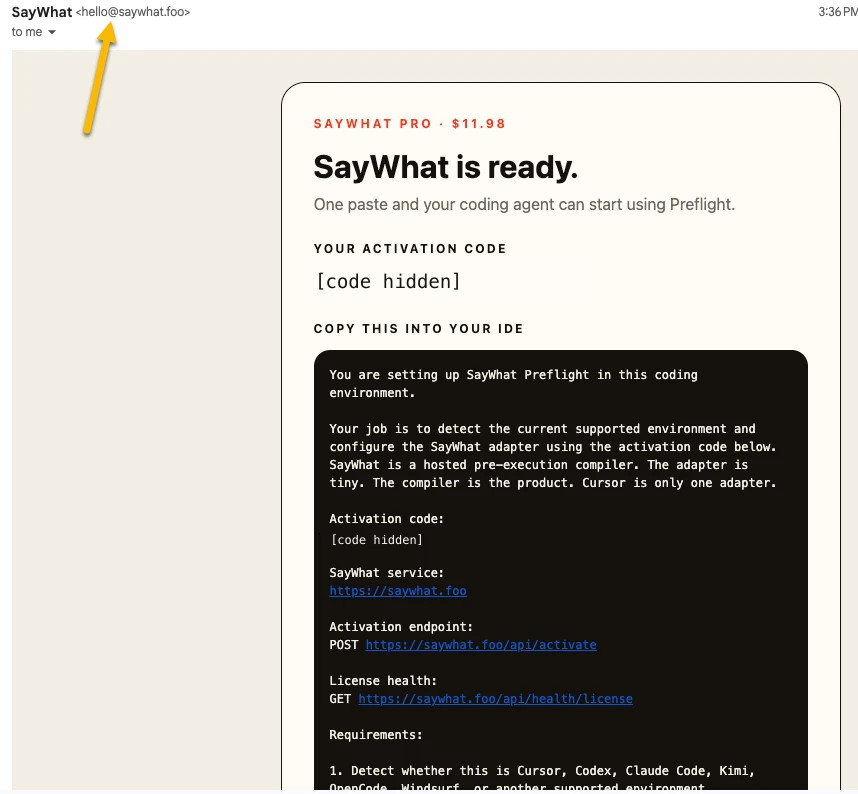
Copy the entire setup prompt under “Copy this into your IDE” from your own email, then paste it into your coding agent’s chat. Use the text in the email, not this screenshot. Follow the install guide for your tool above to finish setup, and keep your activation code private.
The code is like a one-use ticket. Use it to activate an install before it expires. Need a new code or lost the email? Visit Account → Setup.
Other tools and help
Already use Executor? Learn how to connect SayWhat through Executor. It passes requests between tools; your coding agent still does the work.
Stuck on a step? Contact us with the error message. Leave out private codes and tokens.